 Control Center
For iPhone Visitors
-
If you're in the Facebook app
-
Facebook's web browser doesn't support landscape. You need to open the page in an external browser (usually Safari).
Temporary for current and any linked-to pages
1) tap the link to open the page as usual
2) tap the 3 dots ... in the upper right corner
3) tap “Open in external browser”
Permanent for all links to internet pages
1) from "Home", tap "Menu" (3 bars)
2) tap "Settings & Privacy"
3) tap "Settings"
4) tap "Media"
5) tap "Links"
6) Enable "Open in external browser"
Still not working? Continue below:
-
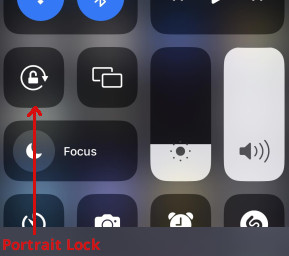
Check that Portrait Lock is disabled
-
1) Open Control Center by swiping down from the top right corner of the screen. If your phone has a Home button, swipe up from the bottom of the screen.
2) Locate the Portrait Lock button. If the lock symbol is red, the phone is locked in portrait mode.
Tap the button to disable (lock symbol changes to white).